Imagine this scenario: You’re away from home, perhaps on vacation or just at work, and a notification pings on your phone. Is it a package delivery? Or something more serious, like an unexpected motion alert? The ability to know instantly what’s happening at your property, and to take action, brings an unparalleled sense of calm. This powerful peace of mind is precisely what a modern home security system offers, transforming your home into a truly connected and protected space. As the video above thoroughly explains, navigating the world of home security systems can feel daunting with so many options available.
This guide expands on the foundational insights provided, delving deeper into the nuances of choosing, implementing, and optimizing a home security system for your specific needs. We’ll explore the underlying mechanics, dissect various monitoring options, and break down the costs involved, ensuring you’re equipped with all the knowledge to make an informed decision for your ultimate home protection in 2025.
Understanding How Home Security Systems Function
At its core, a robust home security system operates through a network of interconnected devices designed to detect and respond to various events. These devices, primarily sensors and cameras, communicate with a central base station, which then relays information to your mobile app. This allows for real-time monitoring and control, putting your home’s security literally in the palm of your hand.
The Role of Smart Sensors and Connectivity
Modern smart home security systems are far more sophisticated than their predecessors. They utilize an array of sensors, each with a specialized function. Door and window sensors detect unauthorized entry, while motion sensors identify movement within designated areas. Glass break sensors add another layer of intrusion detection, alerting you to sudden impacts. Beyond security, many systems integrate environmental sensors for smoke, carbon monoxide, or water leaks, providing comprehensive home safety. These devices often communicate wirelessly using protocols like Wi-Fi, Z-Wave, or Zigbee, ensuring seamless integration and efficient data transfer to the base station.
Arming Modes and Alarm Response Explained
Your security system’s behavior is dictated by its arming mode. Typically, three modes are available: ‘armed away’ secures all sensors when no one is home; ‘armed stay’ activates perimeter sensors (like doors and windows) while allowing movement inside; and ‘disarm’ deactivates the system entirely. When a sensor is triggered in an armed state, a loud siren sounds, designed to deter intruders and alert those nearby. Imagine if a door sensor detected an unauthorized opening while you were at work. The immediate siren is a powerful deterrent, often enough to send a potential intruder fleeing before they can cause further damage or theft.
Professional vs. Self-Monitoring: A Deeper Look
The choice between professional and self-monitoring significantly impacts your home security strategy. The video highlighted the core difference, but let’s delve into what each option truly entails for your peace of mind and response capabilities.
The Advantages of 24/7 Professional Monitoring
Professional monitoring means your home is watched over constantly by a dedicated center. When an alarm is triggered, alerts are instantly sent to trained operators who confirm the alarm’s validity. They attempt to reach you using your pre-registered contact and safeword. If contact isn’t made or the safeword isn’t given, they dispatch appropriate emergency services, whether police, fire, or medical, to your location. This service is invaluable, especially when you’re unable to respond yourself, perhaps due to being asleep, away from your phone, or out of the country. This consistent vigilance ensures that incidents are addressed swiftly and effectively, providing a critical layer of defense.
When Self-Monitoring Might Be Right for You
Self-monitoring places the responsibility of responding to alerts squarely on your shoulders. You receive notifications directly on your mobile app, and it’s up to you to verify the situation—often by checking live camera feeds—and contact emergency services if necessary. This option is typically more budget-friendly as it eliminates monthly monitoring fees. For individuals who are frequently home, have a robust support network of neighbors, or are comfortable with being the primary responder, self-monitoring can be a viable choice. However, it requires constant vigilance and an immediate ability to act, which isn’t always feasible. Consider the peace of mind offered by professional monitoring; nobody can truly self-monitor their home security every hour of every day, making professional services a strong recommendation for consistent protection.
DIY vs. Professionally Installed Home Security Systems
The method of installation is another pivotal decision in your journey to selecting the best home security system. Both DIY and professionally installed options have distinct characteristics that cater to different user preferences and situations.
The Flexibility and Simplicity of DIY Systems
DIY home security systems are designed for straightforward user installation. Brands like SimpliSafe and Cove prioritize ease of setup, often providing pre-programmed devices with peel-and-stick adhesives. This eliminates the need for professional technicians and offers significant cost savings on installation fees, which can range from $0 to a few hundred dollars with professional services. A key advantage of DIY systems is their flexibility; most allow month-to-month contracts for professional monitoring, which can be paused or canceled anytime. This makes them an excellent choice for renters or those who may relocate frequently, as their home security system can move with them.
The Bespoke Experience of Professionally Installed Systems
In contrast, professionally installed home security systems, typically offered by companies like ADT and Vivint, provide a full-service, customized experience. Company representatives work with you to design a system tailored to your home’s specific layout and your security needs. Technicians then expertly install all components, ensuring optimal placement and functionality without you having to lift a finger. This hands-off approach offers maximum convenience and professional assurance. However, these systems often come with higher equipment costs and usually require signing a long-term contract for professional monitoring, typically one to five years. This makes them better suited for homeowners or individuals planning to stay in their current residence for the foreseeable future.
Key Features to Prioritize in Your Home Security System
Beyond monitoring and installation, the equipment itself and your daily interaction with the system (user experience) are crucial factors. Choosing wisely here ensures your home security system is not only effective but also enjoyable to use.
Essential Equipment for Comprehensive Coverage
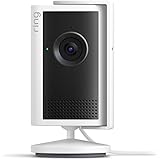
When assessing equipment, ensure the system offers all the devices necessary to protect your specific property. Security cameras are paramount, whether indoor, outdoor, or video doorbells. Some companies produce their own high-quality cameras, such as Vivint, known for advanced features like Smart Deter technology that can actively warn off lurkers. Others partner with established device producers, for example, ADT with Google Nest or Cove with eufy Security. It’s vital to research camera performance, video quality, and specific features like two-way audio or AI-driven person detection. Furthermore, consider smart locks for keyless entry and remote access control, and specialized environmental sensors for a truly comprehensive safety net. These additions collectively bolster your home’s overall security infrastructure.
Enhancing Your Experience: Mobile Apps and Control Panels
The user experience is heavily influenced by the system’s mobile application and any physical control panels. A well-designed app should be intuitive, easy to navigate, and reliably perform its stated functions. Some apps, like SimpliSafe’s, offer a streamlined experience, while others, such as Arlo’s, provide extensive customization options that may require a learning curve. Neither approach is inherently superior; it simply comes down to personal preference for control versus simplicity. Additionally, many systems offer touchscreens or keypads as dedicated control centers. Brands like ADT, Vivint, and Cove feature impressive touchscreen panels for multifaceted control, while others like SimpliSafe and Ring provide keypads for basic arming and disarming. Evaluating these interface options is crucial to finding a home security system that seamlessly integrates into your daily life.
Demystifying Home Security System Costs
The cost of a home security system varies significantly based on your home’s size, your specific needs, and the chosen system’s features. It’s essential to understand the three main components of pricing: installation, equipment, and monthly monitoring.
Breaking Down Installation and Equipment Expenses
Installation costs are typically one-time fees, primarily associated with professionally installed systems. These can range from $0 to several hundred dollars, often waived with certain promotions. DIY systems usually have no installation fees since you handle the setup. Equipment costs encompass all sensors, cameras, and smart home devices. DIY systems often prove more economical here; comprehensive systems with multiple sensors, an outdoor camera, and a video doorbell can be purchased for less than $500 from brands like SimpliSafe and Cove. Professionally installed systems, while costing more—for example, Vivint’s Core Home Security System starts at $599, with a full-fledged system potentially reaching $1400—often justify their price with advanced technology and premium design, offering superior performance and aesthetics. Understanding these initial investments helps you budget effectively for your new home security system.
Navigating Monthly Monitoring Fees and Contracts
Monthly monitoring costs are recurring fees for 24/7 professional surveillance and additional services like cellular backup or cloud video storage. These can range from as little as $10 to over $60 per month, though most top-tier services fall between $30 and $40. It’s crucial to note that professionally installed systems like ADT and Vivint typically require a long-term monitoring contract, usually one to five years. This commitment makes them suitable for long-term homeowners. In contrast, DIY systems generally offer month-to-month billing, providing flexibility for renters or those who prefer no long-term ties. Some brands, such as Wyze and Ring, even offer discounts for annual payments, adding another layer of cost-effectiveness to these adaptable home security systems.
Your Home Security Queries: Fortifying Your Future
What is a home security system?
A home security system uses connected devices like sensors and cameras to detect events at your property. It provides real-time alerts to your phone, giving you peace of mind and control over your home’s safety.
How do home security systems work?
The system operates through a network of devices like sensors and cameras that communicate wirelessly with a central base station. This station then relays information to your mobile app for real-time monitoring and control.
What is the difference between professional and self-monitoring for home security?
Professional monitoring means a dedicated center watches your home 24/7 and dispatches emergency services if an alarm triggers. Self-monitoring puts the responsibility on you to respond to alerts and contact authorities.
What are the two main ways to install a home security system?
You can choose a DIY (Do-It-Yourself) system, which you set up yourself, or a professionally installed system where technicians handle all the installation for you.
What are the typical costs associated with a home security system?
The costs usually include one-time installation fees (if professionally installed), the price of the equipment like sensors and cameras, and recurring monthly fees for monitoring services.