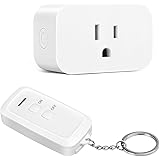
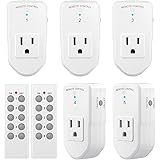
Setting up smart home devices does not need to be complicated; integrating Gosund Smart Plugs into your home automation system, especially with popular platforms like Alexa, is surprisingly straightforward and offers immense convenience. As demonstrated in the accompanying video, these smart plugs provide a simple, effective solution for automating various devices around your house, both indoors and outdoors. They empower users to transform ordinary appliances into smart devices with minimal effort, bringing enhanced control and efficiency to everyday living.
Unlock Smart Home Convenience with Gosund Smart Plugs
Gosund Smart Plugs serve as an excellent entry point for anyone interested in smart home technology, offering robust functionality alongside an intuitive setup process. These versatile devices allow you to manage your electronics remotely, create automated schedules, and even use voice commands through virtual assistants. Beyond simple on/off control, smart plugs enhance daily routines and provide peace of mind.
Consider the practical applications for these smart devices within your living space. For instance, outdoor lighting can be automatically managed by a schedule, ensuring your landscape lights illuminate exactly when needed. Similarly, during festive periods, Gosund Smart Plugs simplify the control of holiday decorations, eliminating the need to manually plug and unplug numerous items. This level of automation significantly streamlines household management.
Understanding the Benefits of Smart Plugs
The advantages of incorporating smart plugs into your home extend far beyond basic remote control. These devices offer a range of benefits that contribute to a more convenient, energy-efficient, and secure environment. Understanding these benefits can help you maximize the value of your smart home investment.
-
Enhanced Convenience: Imagine controlling your lights, fans, or coffee maker with just a tap on your phone or a simple voice command. Smart plugs bring this convenience to your fingertips, saving you time and effort. You can turn off forgotten appliances from anywhere, ensuring peace of mind.
-
Energy Efficiency: Smart plugs allow for precise scheduling of devices, preventing them from drawing power unnecessarily. For example, you can set a desk lamp to turn off automatically after business hours, reducing standby power consumption. Monitoring energy usage is also a feature in some advanced models, offering insights into your electricity consumption.
-
Improved Home Security: When away from home, smart plugs can be used to create the illusion of occupancy. By scheduling lights to turn on and off at random times, you can deter potential intruders. This simple trick adds an extra layer of security without complex installations.
-
Accessibility: For individuals with mobility challenges, voice-activated smart plugs can be a game-changer. Controlling devices without physically interacting with switches makes daily tasks significantly easier. It provides independence and convenience for all household members.
-
Seasonal & Holiday Automation: As demonstrated in the video with five plugs for holiday lights, smart plugs excel at managing seasonal decorations. Timers and schedules ensure your festive displays are always perfectly lit, enhancing the ambiance without manual intervention. This applies to both indoor and outdoor seasonal setups.
Seamless Setup with the Smart Life App
The process of setting up your Gosund Smart Plugs begins with the user-friendly Smart Life app, available on both Google Play and the App Store. This application serves as the central hub for managing all your compatible smart devices. Following a few simple steps, you can quickly get your smart plug connected and ready for automation.
First, plug your smart device into a power outlet. Next, open the Smart Life app and either register a new account or log in with existing credentials. Registering is a quick process, guiding you through a few screens to create your profile. Once logged in, select the option to add a new device, specifically choosing “Socket Wi-Fi” from the available categories.
To finalize the connection, activate the smart plug’s pairing mode by holding its power button for approximately five seconds until it blinks rapidly. Confirm this rapid blinking within the app, then enter your Wi-Fi network password. The app will then connect to your smart plug, adding it to your device list. This allows you to rename the device for easy identification, such as “Desk Plug” or “Garden Lights,” directly within the app.
Integrating Gosund Smart Plugs with Amazon Alexa
Once your Gosund Smart Plugs are set up in the Smart Life app, integrating them with Amazon Alexa for voice control is the next logical step. This integration unlocks a powerful level of convenience, allowing you to manage your devices using simple voice commands. The process is designed to be intuitive, leveraging Alexa’s vast ecosystem.
To begin, open your Amazon Alexa app and navigate to the “Skills & Games” section from the main menu. Use the search bar to find and enable the “Smart Life” skill. If you have previously enabled this skill, your new Gosund Smart Plug should automatically appear under “Devices” within the Alexa app. This seamless integration ensures minimal manual configuration.
If the device does not appear automatically, manually add it by clicking the plus sign in the “Devices” section and instructing Alexa to “Discover Devices.” Alexa will then scan for new compatible devices, including your newly configured smart plug. Once discovered, you can assign it to rooms, create routines, and, most importantly, control it with voice commands like “Alexa, turn on the desk plug.” This simple voice activation significantly enhances daily usability.
Expanding Your Smart Home with Gosund Smart Plugs
The versatility of Gosund Smart Plugs means they can be deployed in numerous scenarios to simplify your daily life. Consider automating appliances like coffee makers to start brewing before you wake up, or setting lamps to turn on at dusk. These small additions contribute significantly to a more modern and responsive home environment, reflecting a truly smart living experience.
Beyond the common uses, smart plugs can also manage charging stations for phones and tablets, preventing overcharging by scheduling power cut-offs. They can even control humidifiers or diffusers, turning them on and off based on your preferred schedule. The ability to remotely manage these items provides unparalleled flexibility and control, even when you are away from home. Truly, these smart plugs offer diverse functionality for every homeowner.
Plugging Into Your Gosund Smart Plug Questions
What are Gosund Smart Plugs?
Gosund Smart Plugs allow you to turn ordinary appliances into smart devices. They let you control electronics remotely, set schedules, and use voice commands.
What are the main benefits of using Gosund Smart Plugs?
They offer enhanced convenience by controlling devices from anywhere, improve energy efficiency through scheduling, and boost home security by making it look like someone is home.
How do I set up a Gosund Smart Plug?
First, plug it in and use the Smart Life app to register or log in. Then, add the device by selecting “Socket Wi-Fi” and following the app instructions to connect it to your Wi-Fi.
Can I control Gosund Smart Plugs with Amazon Alexa?
Yes, you can integrate them with Amazon Alexa for voice control. Simply enable the “Smart Life” skill in the Alexa app, and your smart plugs should appear as controllable devices.